Your Protocol. Their Journey.

Pulsar shapes every message around each participant's real-world data: their Fitbit steps, their weight from the scale that morning, their timezone, their response patterns, their place in the study. You define the rules once. Their data decides the rest.

Your Study, Right Now.

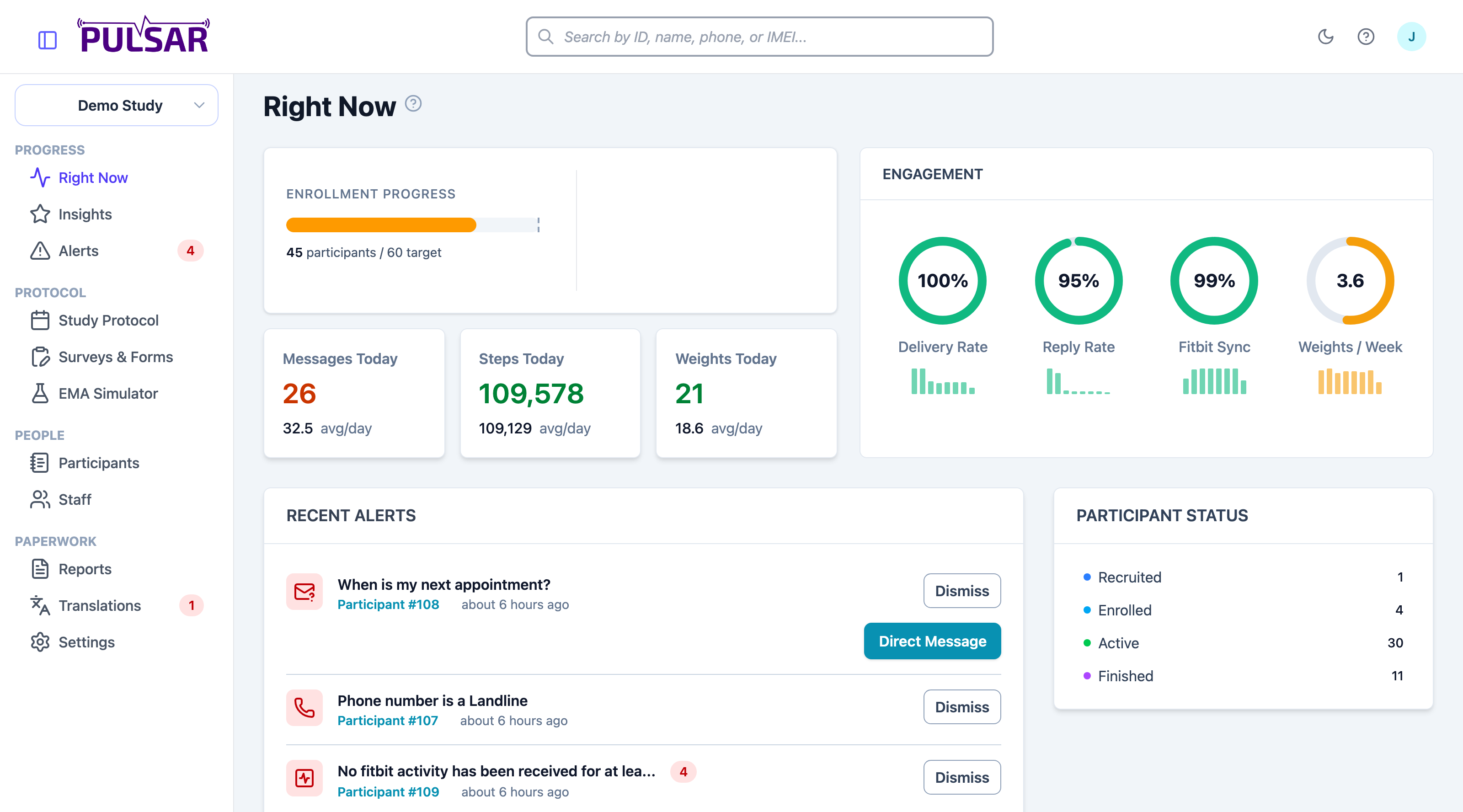
The screen your team opens in the morning, live from your first enrollment. Today's messages, steps, and weights each sit against this study's own daily average. Delivery, reply, and device sync rates carry eight-week sparklines, so a declining pattern shows up weeks before it shows up in your data. Whatever needs a human is already waiting in the alerts panel.

The Right Now dashboard: enrollment progress, today's messages, steps and weights against their daily averages, engagement rings with sparklines, recent alerts, and participant status

Core Messaging Capabilities

Everything you need to run sophisticated message-driven research studies.

Pulsar participant roster with status filtering, weight sparklines, and Fitbit sync badges

Participant Management Made Easy

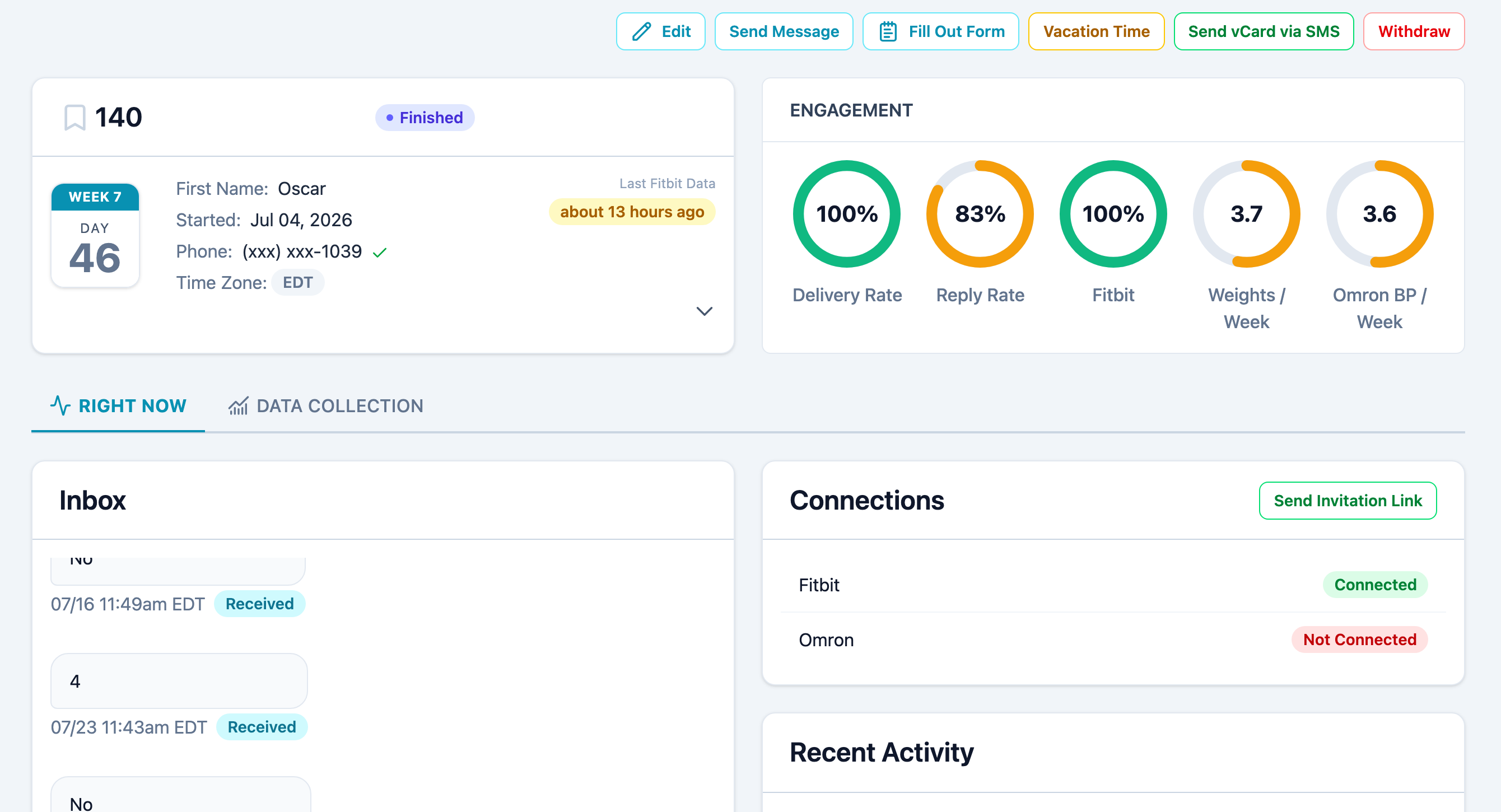
Their week and day in the study, their engagement measured against this study's own rates, the full message thread in both directions, and exactly which device connections are live.

  • Text them directly when a protocol message isn't the right tool
  • One invitation link covers every device they haven't connected yet
  • Vacation time, withdrawal, and a form you can fill out on their behalf

One Screen for the Whole Protocol

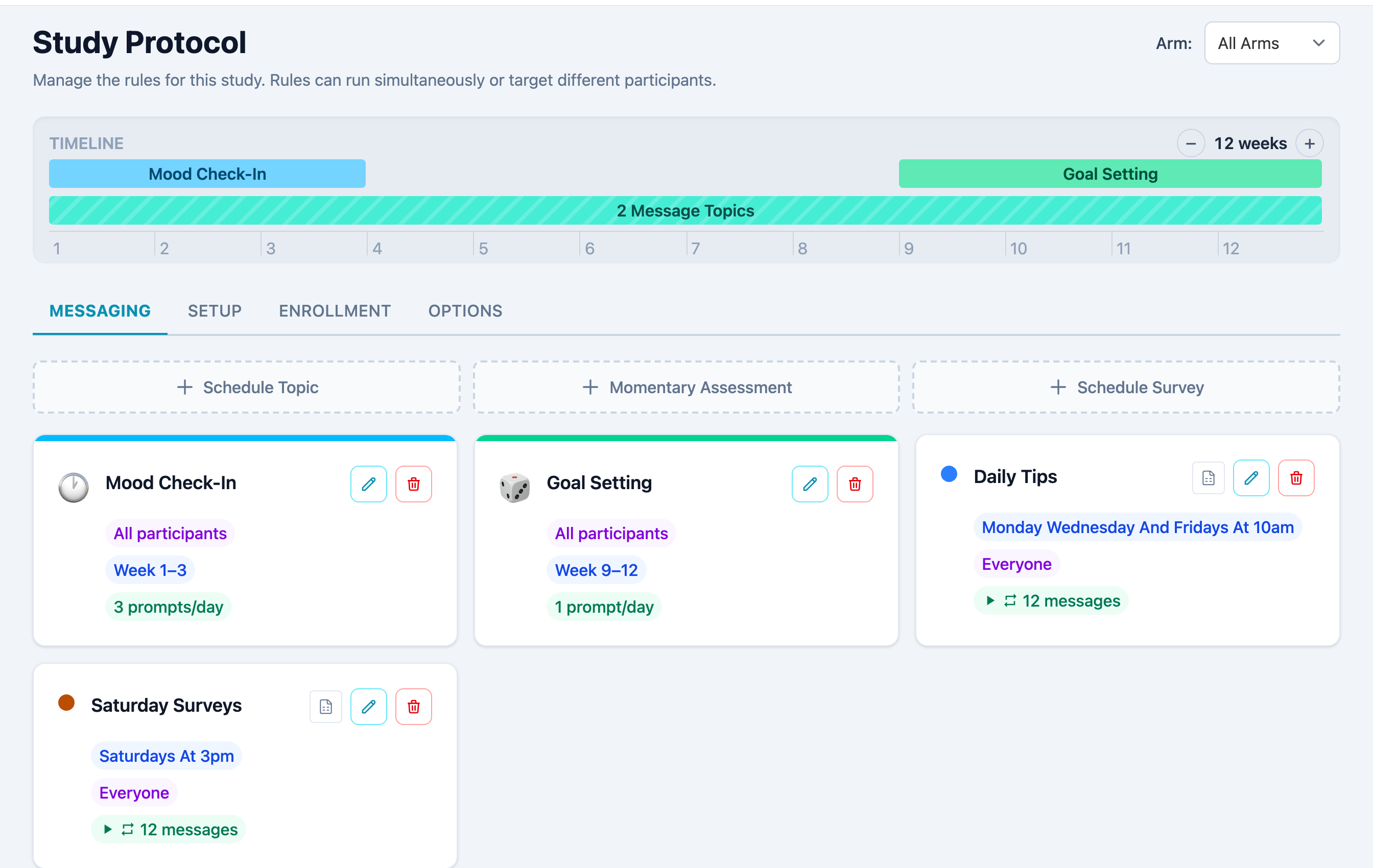
Scheduled message topics and momentary prompts live together, with a timeline across the top showing which rules overlap in any given week. Every card carries its audience, its active weeks, and how often it fires.

  • Timeline you can scan week by week, filtered to a single arm
  • Topics, momentary assessments, and scheduled surveys side by side
  • Audience segmentation written in plain English and verified before it fires
The Study Protocol screen: a twelve-week timeline showing rule overlap, above cards for each message topic and momentary assessment
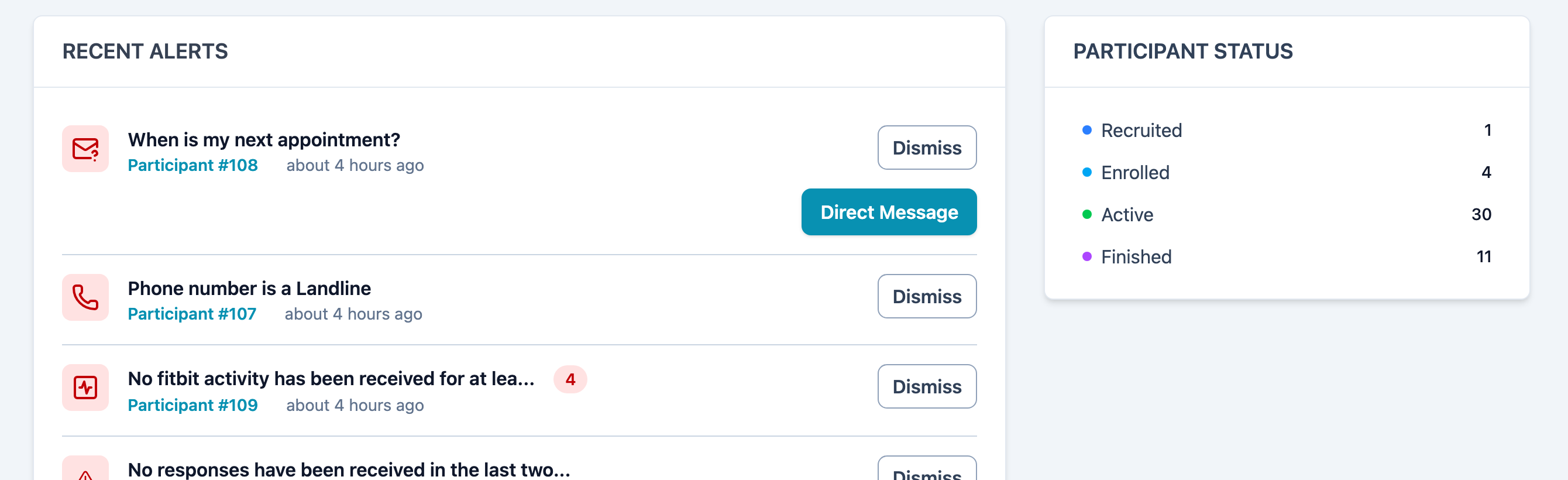
Pulsar alerts page showing landline detection alert with dismiss action

Smart Alerts

Pulsar detects problems before they become crises. Root-cause diagnosis tells you exactly why something failed - landline, carrier block, or missing device data - with inline actions to resolve.

  • Multiple alert categories with automatic detection
  • One-click resolution and/or automated self-resolution
  • Email digests and instant notifications

Reports & Data Export

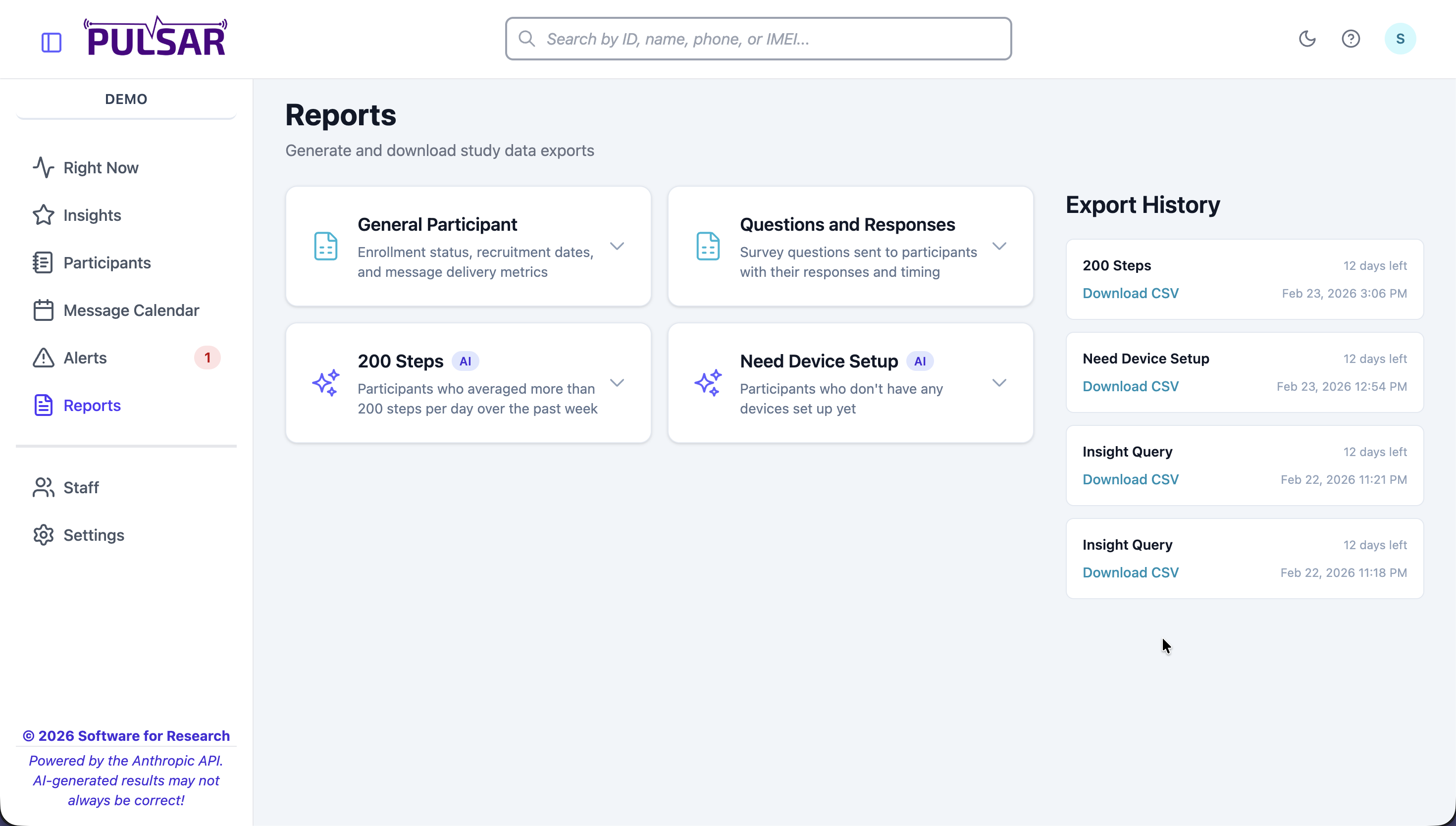
Standard and AI-generated reports ready when you need them. Export history with timestamps for IRB compliance. Download CSV data for your own analysis.

  • Standard reports plus AI-generated custom reports
  • Complete export history with audit trail
  • CSV download for external analysis
Pulsar reports page with standard and AI-generated reports and export history
Timezone-Aware
9am means their 9am
JITAI
Threshold prompts, skip and snooze
Coach Messaging
Direct outreach and broadcasts
Randomization
Concealed allocation, blinded
HIPAA Compliant
Full audit trail for IRB

Visual EMA Designer

Design sophisticated EMA and survey-sampling protocols with a guided visual wizard. No coding required.

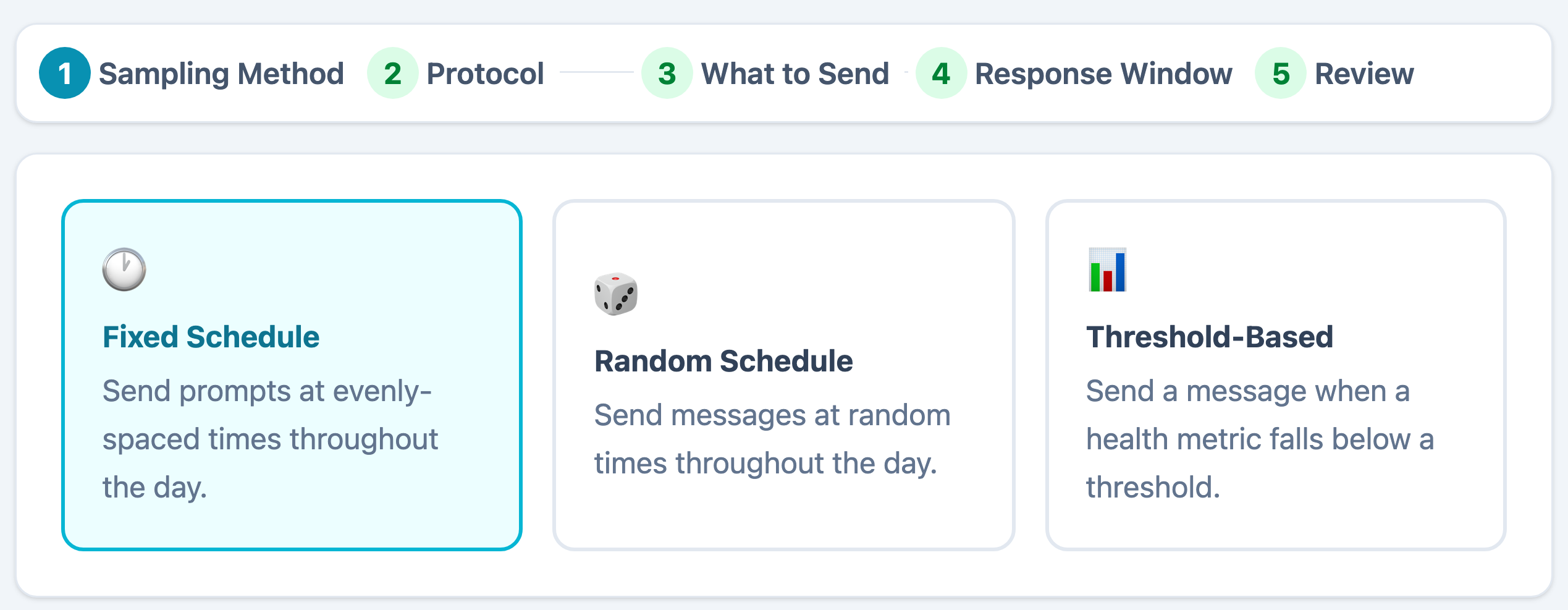
Protocol Designer showing Fixed Schedule, Random Schedule, and Threshold-Based options

Choose Your Sampling Mode

Select how participants receive prompts: fixed schedule for evenly-spaced times, random schedule for unpredictable sampling, or threshold-based to fire when a health metric falls below a target.

Then walk through scheduling, message content, response windows, and skip conditions, all in a guided wizard. Review a plain-English summary before going live.

Message Pools

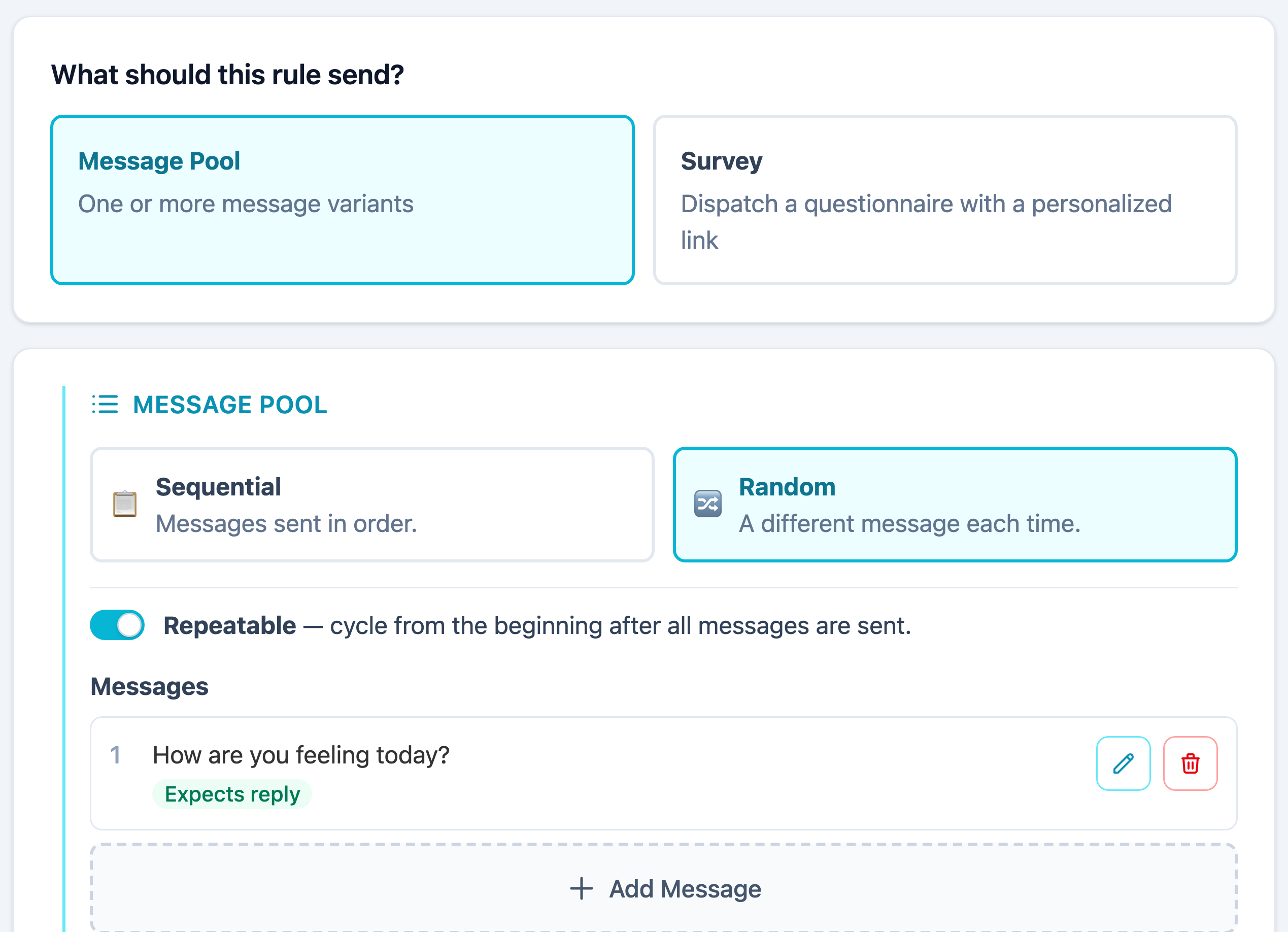
Message pools are a simple yet super effective way of defining the messages participants receive. Choose sequential delivery (in order) or random (a different message each time). A pool can reset automatically after all messages have been exhausted, or remain in an empty state so that no more messages will be sent from that pool.

Add, edit, or reorder messages anytime. Each prompt can include survey-style questions that participants respond to directly.

The wizard's What should this rule send step: Message Pool or Survey, then sequential or random delivery, a repeatable toggle, and the list of message variants

Flexible Scheduling

Signal-contingent, interval-contingent, and event-contingent sampling. Random prompts within defined windows or fixed schedules.

Biometric Triggers

Trigger surveys based on heart rate, step counts, or sleep data from connected wearables. Threshold-based prompting built in.

Waking Windows

Respect individual sleep schedules. No prompts during sleep hours. Automatic adjustment per participant.

Push Notifications

Native mobile notifications with configurable reminders. Response windows prevent stale data collection.

Skip Conditions

Define when to skip or delay prompts based on recent responses, sensor data, or inbound keywords. Delay or reset modes.

Compliance Tracking

Real-time dashboards show response rates, completion times, and participant engagement. Spot declining patterns early.

Randomization Your Reviewer Will Accept

Upload the allocation list your statistician produced, stratified however your design calls for. It is held as data, so it can be exported and audited later.

We will generate one for you too, and tell you plainly that generating it here suits unblinded, low-risk work only.

Run it blinded

Turn off arm reveal and assignment disappears from participant pages, from Insights answers, and from every export automatically. Per-arm counts still work, because a count shows the balance of the trial, not anybody\'s assignment.

Managing the list and reading it are separate permissions, so a coordinator can maintain a list they are not allowed to open.

The Instrument You Need Is Already Here

PHQ-9, PHQ-2, GAD-7, GAD-2, AUDIT, AUDIT-C, PCL-5, PC-PTSD-5, PHQ-15, and WHO-5 ship ready to attach. So do a HIPAA authorization and an informed consent template with placeholders for your IRB's approved language.
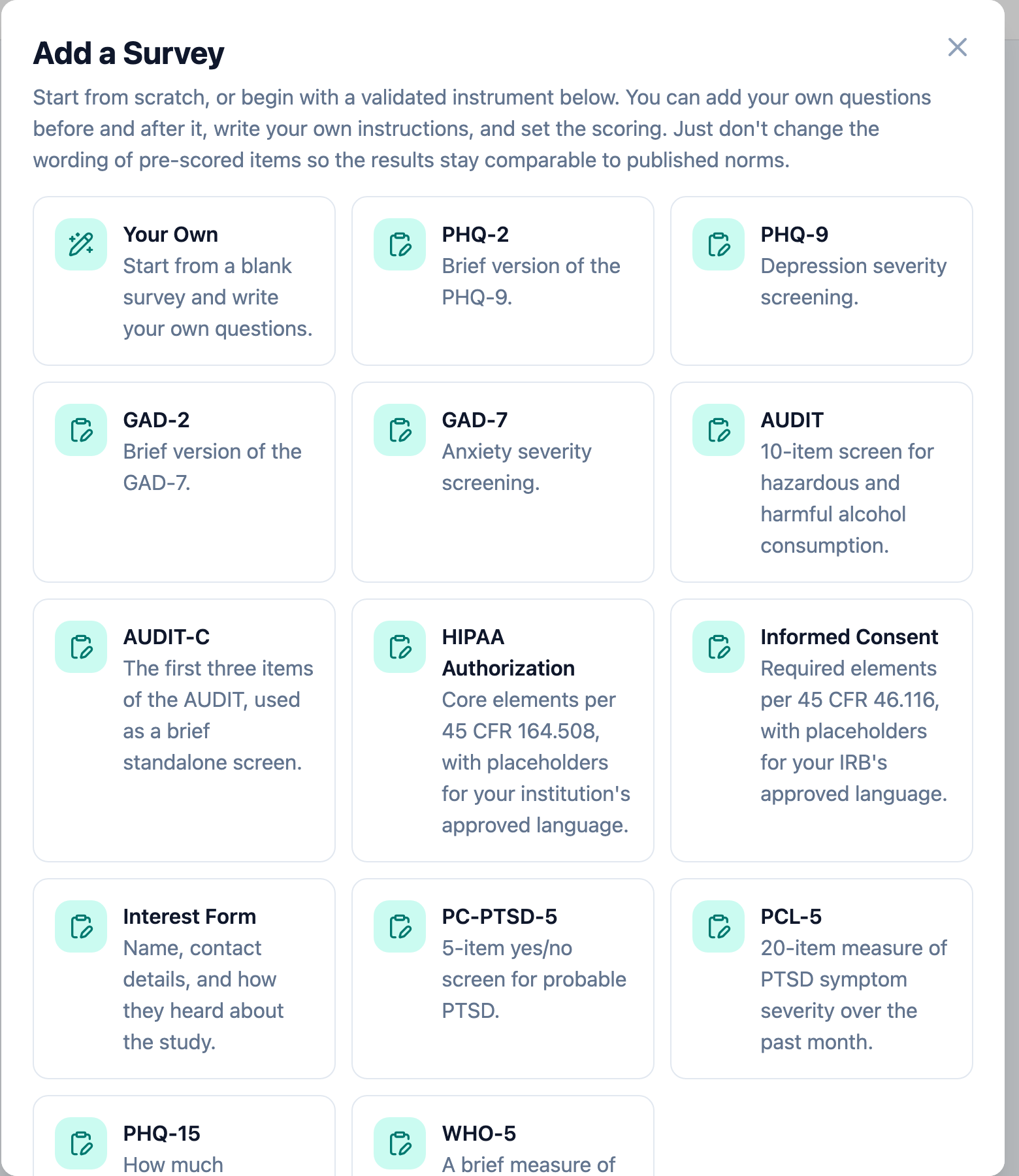
The survey catalog listing validated instruments including PHQ-9, GAD-7, AUDIT, and PCL-5

Start blank, or start from a validated instrument and add your own questions around it. Just don't reword the scored items, so your results stay comparable to published norms.
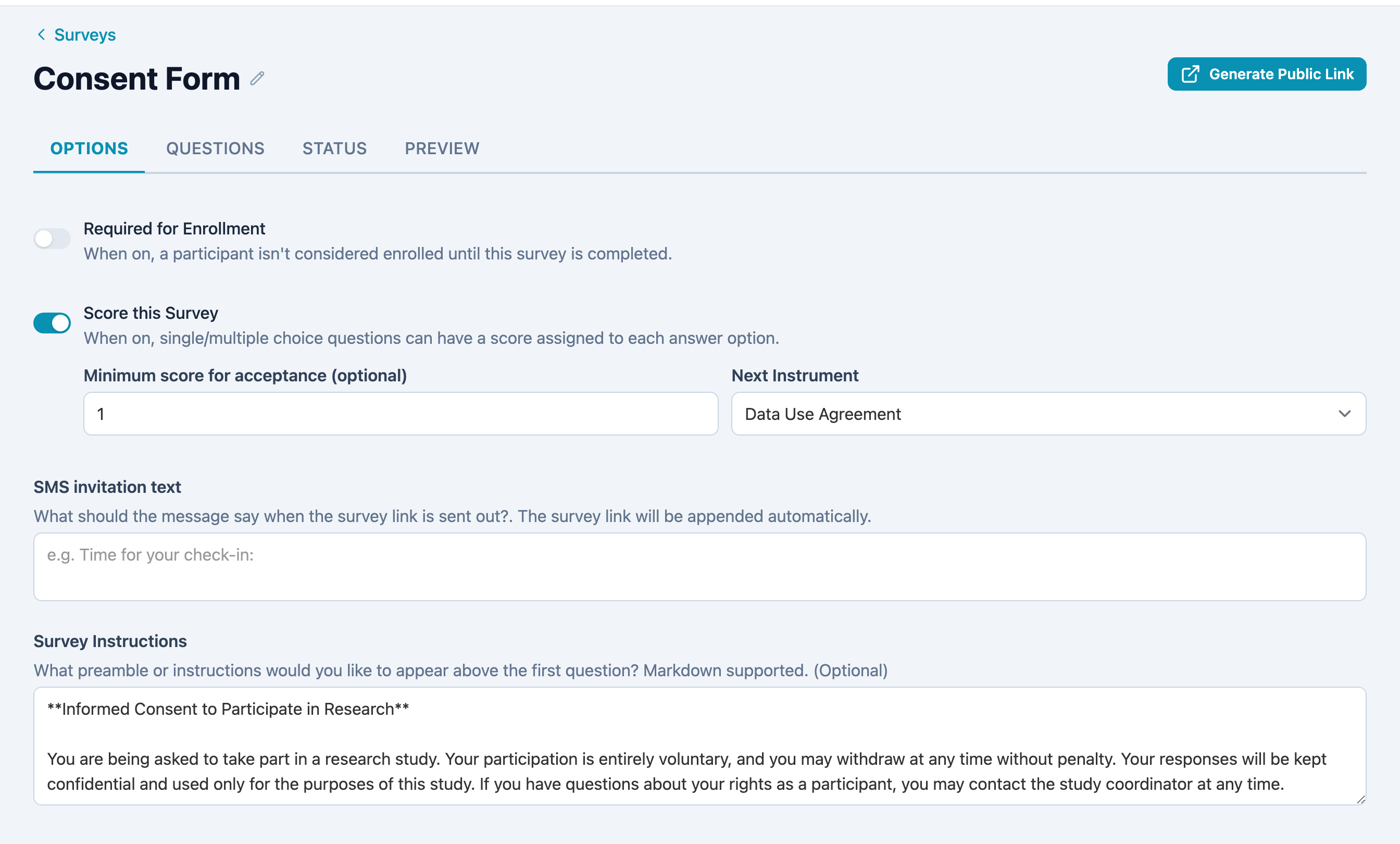
The survey options tab: required for enrollment, scoring with a minimum acceptance score, the next instrument to chain to, SMS invitation text, and survey instructions

Every instrument's setup in one place: whether it gates enrollment, how it scores, which instrument it chains to next, and the text that goes out with the link.

Score gating

Score each answer, set a threshold, and chain to a follow-up instrument that only fires when the threshold clears. A brief screener leads to the long one, but only for the people who qualify.

A link and a QR code

Publish any instrument to a public URL with no login required, with a QR code to match. That's how a flyer works.

Or bring your own

Already built it in Qualtrics? Link it, and each participant gets their own personalized link on your schedule.

Research Intelligence Built In

Describe the protocol you want and review what it drafts. Ask a question about your own data and get an answer. You approve everything before a participant sees it.

AI Topic Generation

One Protocol. Many Experiences.

Use our internal Anthropic engine to personalize messages based on each participant's journey. Your data doesn't go anywhere; our AI engine is built-in so your study remains secure. You review everything before anything is sent out, so you can let the computer do the grunt work while supervising and ensuring the best outcome for your study.

  • Now powered by AI in just the right places
  • Review and test everything before it goes live
  • Spanish translation support built in
YOU WRITE:
"Send daily motivation at 9am with 3 rotating messages. Use different messages for participants under 30 vs over 30."
PULSAR GENERATES:
Topic: "Daily Motivation"
Schedule: Every day at 9:00 AM (local time)
Audience: Under 30
Rule: age < 30 • Bucket: 3 templates (random)
"Hey {first_name}, you've got this! Day {day_number} strong."
Audience: 30 and over
Rule: age ≥ 30 • Bucket: 3 templates (random)
"Good morning {first_name}. Day {day_number} — steady progress."
✓ Topic, rules, buckets, and 6 templates created.
Ask Your Data

Stop Waiting for Reports

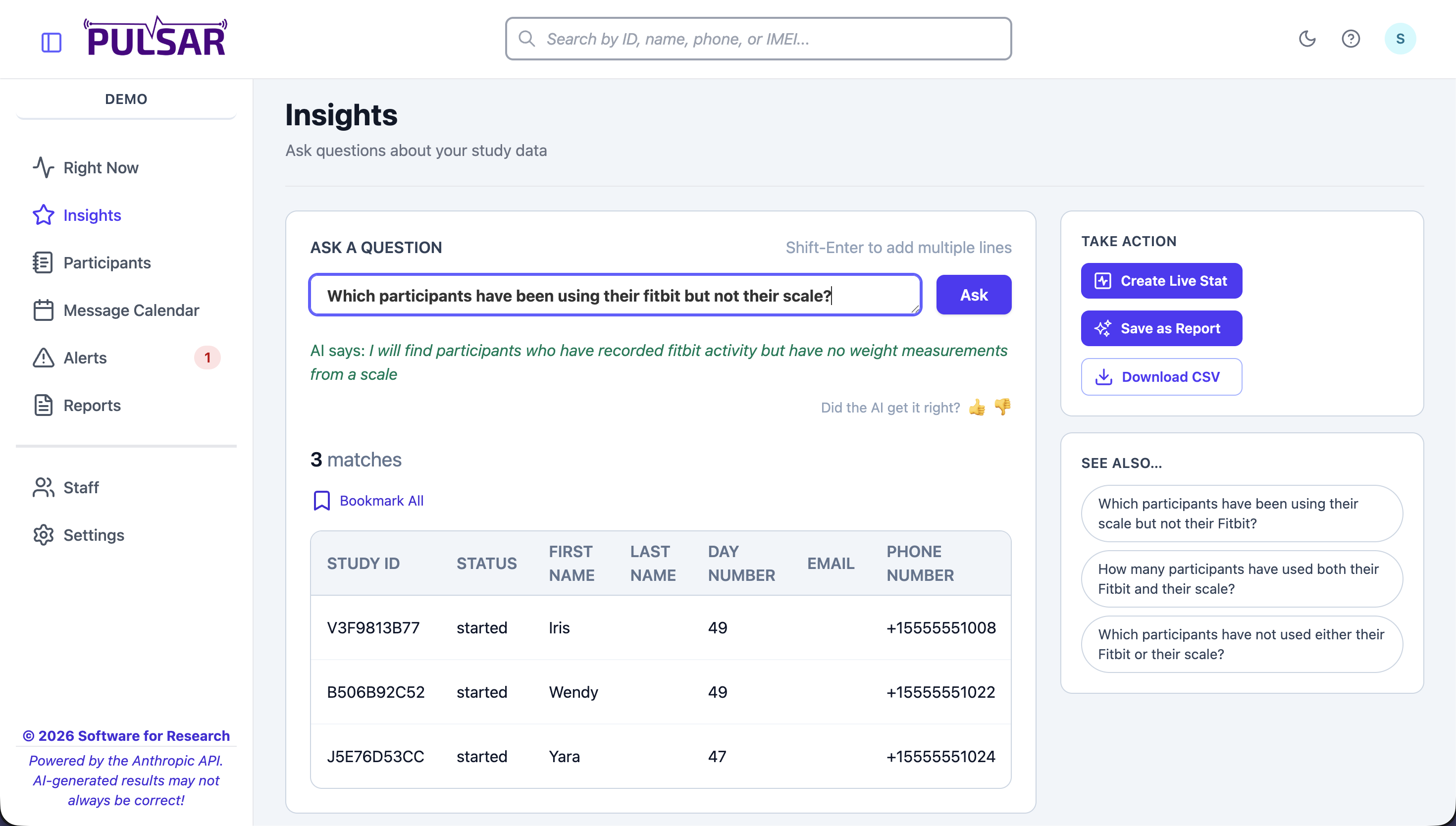
Ask questions in plain English. Get instant answers across messages, Fitbit, weights, and nutrition data. Save queries as live stats, export to CSV, or bookmark for quick access.

Pulsar Insights page showing natural language query with results table and suggested follow-ups
AI Messages

Every Message, Written for One Person

Mark any template for AI generation. Personalized content is written at the moment of delivery using real participant data.

TEMPLATE:
"Generate an encouraging message about their recent activity, referencing step count and day in study."
SARAH (Day 12, 9,400 steps):
"Sarah, 9,400 steps yesterday — that's your best day this week! Day 12 and you're building real momentum."
MARCUS (Day 5, 3,200 steps):
"Hey Marcus, day 5 is all about finding your rhythm. Every step counts — even the 3,200 from yesterday."

Your Devices. Syncing Themselves.

Pulsar connects to the tools your study already uses.

Twilio
SMS Delivery
Fitbit
Steps, Heart Rate, Sleep
Bodytrace
Cellular Scales
Cronometer
Nutrition Tracking
REDCap
Roster Sync
AI Engine
Message Personalization

Ready to modernize your messaging research?

Schedule a chat! No pressure to commit. We're happy to answer questions and to chat about your study compatibility with our platform.